
Learning objectives
By the end of this lesson, you will know:
-
How to create a transformation.
-
About working with object type messages.
-
How to execute transformation steps within services.
Key concepts
- Transformations - take one message type and convert it to another message type.
Creating the messages
In this learning module, you will create a new message to represent a Person object, and then create another message that can store multiple Person object messages.
Learning activity
training:PersonObject message
To create a new message to represent a Person object:
-
In the Integration layer, select the Messages tab. Create a new message called
training:PersonObject. -
Click the Source tab of the message and replace the contents with the following code. This is the XML code that would be generated if you used the user interface to create the message.
XML<Message format="Object"> <ObjectMapping class="Person"/> <Parts> <Value name="firstName" type="string"> <ObjectMapping/> </Value> <Value name="initials" type="string"> <ObjectMapping/> </Value> <Value name="lastName" type="string"> <ObjectMapping/> </Value> <Message maxCount="0" name="telcoms"> <ObjectMapping attribute="telcoms" class="Telcom" local="true"/> <Parts> <Value name="class" type="string"> <ObjectMapping attribute=":class" create="false" update="false"/> </Value> <Value name="name" type="string"/> <Value name="address" type="string"/> <Message minCount="1" name="type"> <ObjectMapping attribute="type" class="TelcomType" create="false" local="false" update="false"/> <Parts> <Value name="name" type="string"> <ObjectMapping attribute="name" create="false" key="true" update="false"/> </Value> </Parts> </Message> </Parts> </Message> </Parts> </Message>
-
Click the Overview tab and your message should look similar to the following:
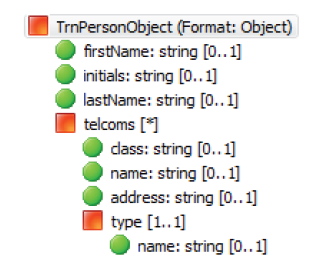
The type part of the telcoms part maps to the TelcomType class and has a single value: name, which is used as a key (see the key property) to look up the telcom type.
Learning activity
training:PersonObjectCollection message
To create the training:PersonObjectCollection message:
-
Create a message and call it
training:PersonObjectCollection. -
Set its Format to
Object. -
Right-click and Insert Child > Message with the following properties:
-
Name:
persons -
Max Count:
0 -
Ref:
training:PersonObject
Your message should look similar to the following:
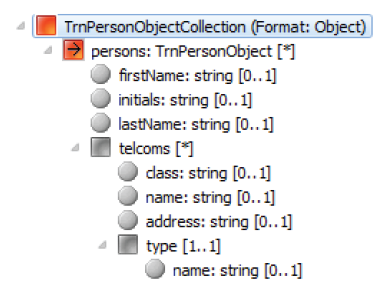
training:PersonObjectCollection message -
Creating the transformation
You will create a transformation that converts a CSV message (training:PersonCSV) to an Object message (training:PersonObjectCollection).
Learning activity
To create the transformation:
-
In the Integration layer, select the Transformations tab. Right-click and select New Transformation.
-
Name the transformation
training:PersonCSVtoObjectand click Finish. -
In the Overview tab, set the Source message to
training:PersonCSVand the Destination message totraining:PersonObjectCollection. -
Go to the Diagram tab where you can map the fields from the source message to the fields of the destination message using drag and drop.
-
Expand the
training:PersonCSVmessage and thetraining:PersonObjectCollectionmessage. -
Drag the
firstNamevalue of thetraining:PersonCSVmessage onto of thefirstNamevalue of thetraining:PersonObjectCollectionmessage. -
Repeat for the
lastNamevalue.
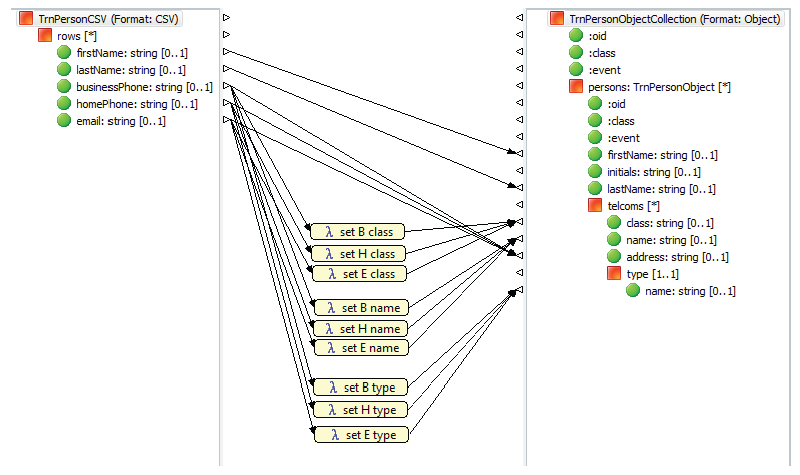
Based on the presence of a businessPhone, homePhone, or email in the source CSV message, you need to create entries in the telcoms object message contained in the training:PersonObjectCollection message. A script can be used to map the businessPhone, homePhone, or email value to the address value of the destination object message, set the class and name, and also lookup the type.
To use a script to map the values:
-
In the Palette, select the Script tool and click in the middle column. A script box appears.
-
Drag the
training:PersonCSVbusinessPhonevalue onto the script box. -
From
training:PersonObjectCollection, drag thetelcomclassvalue onto the same script box. -
Select the script box. In the Property Editor view, click the Mapping tab and set the Name to
set B Class. -
In the Script tab, enter
"TelephoneNumber", including the quotation marks.
When there is a value in thebusinessPhonefield of a CSV row, the class attribute of the associatedTelcommessage is set to"TelephoneNumber". -
Click the Source tab of the
training:PersonCSVtoObjecttransformation and replace its contents with the following code:XML<Transformation destination="training:PersonObjectCollection" source="training:PersonCSV"> <Mappings> <Mapping destination="persons firstName"> <Sources> <Source source="rows firstName"/> </Sources> </Mapping> <Mapping destination="persons lastName"> <Sources> <Source source="rows lastName"/> </Sources> </Mapping> <Mapping destination="persons telcoms name" layout="y:136;x:0.46460176" name="set B name"> <Sources> <Source source="rows businessPhone"/> </Sources> <Script><![CDATA["Business"]]></Script> </Mapping> <Mapping destination="persons telcoms address"> <Sources> <Source source="rows businessPhone"/> </Sources> </Mapping> <Mapping destination="persons telcoms type name" layout="y:203;x:0.48893806" name="set B type"> <Sources> <Source source="rows businessPhone"/> </Sources> <Script><![CDATA["Business"]]></Script> </Mapping> <Mapping destination="persons telcoms class" layout="y:62;x:0.44247788" name="set B class"> <Sources> <Source source="rows businessPhone"/> </Sources> <Script><![CDATA["TelephoneNumber"]]></Script> </Mapping> <Mapping destination="persons telcoms class" layout="y:73;x:0.44911504" name="set H class"> <Sources> <Source source="rows homePhone"/> </Sources> <Script><![CDATA["TelephoneNumber"]]></Script> </Mapping> <Mapping destination="persons telcoms name" layout="y:149;x:0.47566372" name="set H name"> <Sources> <Source source="rows homePhone"/> </Sources> <Script><![CDATA["Home"]]></Script> </Mapping> <Mapping destination="persons telcoms type name" layout="y:218;x:0.48893806" name="set H type"> <Sources> <Source source="rows homePhone"/> </Sources> <Script><![CDATA["Home"]]></Script> </Mapping> <Mapping destination="persons telcoms address"> <Sources> <Source source="rows homePhone"/> </Sources> </Mapping> <Mapping destination="persons telcoms address"> <Sources> <Source source="rows email"/> </Sources> </Mapping> <Mapping destination="persons telcoms class" layout="y:86;x:0.43141592" name="set E class"> <Sources> <Source source="rows email"/> </Sources> <Script><![CDATA["EmailAddress"]]></Script> </Mapping> <Mapping destination="persons telcoms type name" layout="y:232;x:0.4778761" name="set E type"> <Sources> <Source source="rows email"/> </Sources> <Script><![CDATA["Email"]]></Script> </Mapping> <Mapping destination="persons telcoms name" layout="y:161;x:0.48451328" name="set E name"> <Sources> <Source source="rows email"/> </Sources> <Script><![CDATA["Email"]]></Script> </Mapping> </Mappings> </Transformation>
-
Return to the Diagram tab and review the transformation. It should look similar to the following:
Testing the transformation
In this learning activity, you will test the transformation by creating script that:
-
Creates an instance of a
training:PersonCSVmessage. -
Uses the
training:PersonCSVtoObjecttransformation to transform the message to an instance of atraining:PersonObjectCollectionmessage. -
Formats the message to instances of objects.
-
Commits the object data to the database.
-
Reads the data from the database.
Learning activity
To test the transformation:
-
Use an existing scratchpad or create a new one and enter the following code:
Scheme; define a training:PersonCSV message for Joe NewTest with a home phone and an email (define p (message (: :class "training:PersonCSV") (: rows (collection (message (: lastName "NewTest") (: firstName "Joe") (: homePhone "(416) 555-1212") (: email "ed@nexj.com") ) ) ) ) ) ; transform the CSV message to an Object message (define pt (transform-message p "training:PersonCSVtoObject")) ; format the message to instances of objects (define fm (format-message ((pt'persons)'get 0))) ; commit the objects (commit) (define r (read-instance Person '(telcoms) '(= lastName "NewTest") '())) (((r'telcoms)'get 0)'address)
-
Save the scratchpad.
-
Run your server.
-
Issue the first four commands, up to and including
(commit). Your code should run successfully. -
Ensure your test worked by executing the last
(define)command. The output should be similar to the following:; #<Instance<Person, OID:1:V32:0B0AE030EDBB4CB8A96C34C83E762309, CLEAN>(classCode="P", lastName="NewTest", telcoms=Collection(2), phones=Collection(1), emails=Collection(1), primaryTelcom=Instance<TelephoneNumber, OID:1:V32:36391C8BF9ED424384634BC1BFB59109 , CLEAN>, locking=0, partition=Instance<SystemPartition, OID:1:V32:A1B4AC189C453A4C919D9E03503ED184, CLEAN>, firstName="Joey", initials=(), company=(), maritalStatus=())> > ; "(416) 555-1212" >
-
Stop the server.
Modifying the service
You will need to modify the service to use the transformation.
Learning activity
To modify the service:
-
Open the
training:CSVImportService.
Remember that the service currently uses a script to iterate over the CSV message's rows collection. -
Delete the Script step node from the service diagram.
-
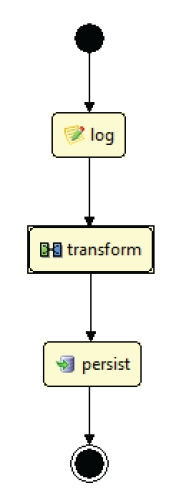
After the log step in the diagram, add a Transform step and a Persist step.
-
If needed, use the Connector tool from the Palette so the service flows from the beginning to the log, transform, and persist steps before it finishes, as shown in the following figure:
-
In the Properties view, set the Transformation property of the transform step to
"training:PersonCSVtoObject", with the quotation marks. -
Save your work.
Testing the modified service
Let's verify the modified service.
Learning activity
To test the modified service:
-
Start the Server Console.
-
When the server has launched, copy the
test.csvfile from the previous learning module to the Incoming Directory, as specified in the Development environment fortraining:CSVImportChannel.
The server log shows processing information similar to the following:SchemeIncoming rows: #<[TO<, @1762367942>( lastName="Test", firstName="Joe", homePhone="(416) 555-1212" ), TO<, @2023541770>( lastName="Doe", firstName="Jane", email="jane.doe@nexj.com" )]>
-
Stop the Scheme Console.
-
Verify that Joe and Jane are listed in the database.